
Request for Information (RFI)
Pave Bank may request additional information about an account or transaction by raising a Request for Information (RFI).
The Request for Information (RFI) process is used by Pave Bank to request additional information about an account or transaction. This guide walks through the complete workflow from receiving an RFI to submitting structured responses.
Overview
The RFI process consists of the following steps:
- Receive RFI Notification - An RFI is received with one or more questions requiring responses
- Fetch RFI Details - Retrieve the full RFI information including all questions
- Generate Upload URLs - For document-type questions, create signed upload URLs
- Upload Documents - Upload required documents to the generated URLs
- Submit Responses - Submit structured responses with text and/or document references
Note: The full RFI lifecycle can be simulated in the sandbox environment.
Step 1: Receive RFI Notification
When Pave Bank raises an RFI, a webhook notification is sent containing the RFI details. Each RFI contains one or more questions that require responses. See the RFI Webhook section for event types and payload format.
All RFIs can also be retrieved via polling with:
Step 2: Fetch RFI Details
Retrieve the full RFI information using the RFI ID:
The endpoint will return:
- RFI metadata (ID, type, status, created and updated date, etc)
- List of questions with their unique IDs and types
- Existing responses, if any
Step 3: Generate Upload URLs
For questions requiring document uploads, first generate signed upload URLs before uploading the documents.
Request:
Parameters:
related_id: The ID of the related entity (the RFI ID)content_type: MIME type of the document (e.g.,application/pdf,image/png)document_type: The type of document being uploaded (see Document Types)
Response:
Step 4: Upload Documents
Upload the documents to the signed URL provided in the previous step:
Important:
- Use the exact
Content-Typespecified when generating the upload URL - The upload URL expires after a short period (see
expires_at) - Keep the document ID (
idfrom the upload URL response) for later reference
Step 5: Submit Responses
Submit a response to each RFI question using the question ID. The request body is a structured response where question_type must be set, along with the matching question-type field containing the response data.
Request:
The request must include question_type and a field keyed by that question type. For example, a text-based question:
For a document-upload question:
Response:
RFI Statuses
Both RFIs and their questions share the same set of statuses. Understanding these is key to testing the full lifecycle.
| Status | Description | Final Status? |
|---|---|---|
action_required | Waiting for customer to respond | No |
pending_review | Customer has responded, waiting for staff review | No |
approved | Staff has approved the response(s) | Yes |
rejected | Staff has rejected the response(s) | Yes |
closed | Manually closed without a decision | Yes |
timeout | No response received within the allowed period (30 days from last update) | Yes |
How Statuses Change
Question-level transitions:
RFI-level transitions:
The RFI status is automatically derived from its questions:
- If any question is
action_required→ RFI isaction_required - If all questions are
pending_reviewor final → RFI ispending_review - RFI reaches a final state (
approved,rejected,closed) only via an explicit RFI Action
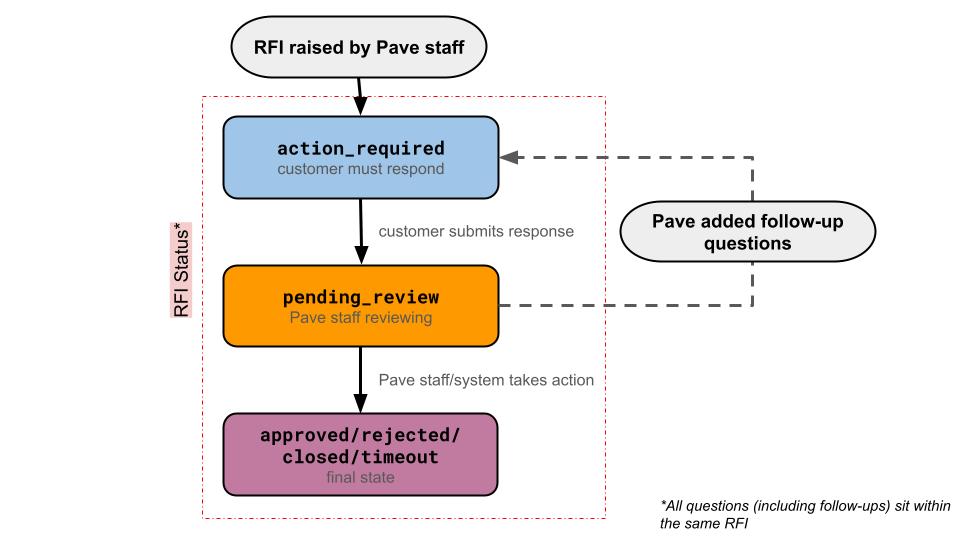
An action cannot be performed on the entire RFI until all of its
questions are in a final status (approved, rejected, or closed).
Resolve each question first using the RFI Question
Action endpoint.
RFI Types
Each RFI is associated with a type that indicates what entity it relates to:
| Type | Description |
|---|---|
transaction | Related to a specific transaction |
account | Related to an account |
nominal_sub_account | Related to a nominal sub-account |
nominal_sub_account_opening | Related to a nominal sub-account opening |
segment_upgrade | Related to a segment upgrade |
nominal_sub_account_kyc | KYC documents for the individual behind a nominal sub-account |
nominal_sub_account_kyb | KYB documents for the organization behind a nominal sub-account |
Question Types
An RFI may contain one or more questions, each with a specific question type. Below are all the potential question types organized by category:
RFI Webhook
Events
When an RFI is created and/or status changes, a webhook event is sent to the configured webhook URL. The following events are delivered:
| RFI | Question |
|---|---|
rfi.action_required | rfi.question.action_required |
rfi.pending_review | rfi.question.pending_review |
rfi.closed | rfi.question.closed |
rfi.approved | rfi.question.approved |
rfi.rejected | rfi.question.rejected |
rfi.timeout | rfi.question.timeout |
Payload Example
Webhooks are signed using ECDSA. Verify the signature using the
Pave-Signature header included with each request. See Verifying Webhook
Signatures for details on
signature verification.